Pentru cartea electronică de identitate (CEI)For the Romanian electronic ID card (CEI)
Ai deja o semnătură electronică. E pe buletin.You already have an electronic signature. It’s on your ID card.
Te autentifici pe site-uri, semnezi PDF-uri și îți vezi datele de pe cip. Pe iPhone prin NFC, pe Mac cu un cititor USB sau prin iPhone.Sign in to websites, sign PDFs and see what’s on the chip. On the iPhone over NFC, on the Mac with a USB reader or through your iPhone.
Descărcare gratuită · ID Signer Pro, plată unică · macOS 26 și iOS 26 · Fără contFree download · ID Signer Pro, one-time purchase · macOS 26 and iOS 26 · No account
iPhone
Card citit prin iPhoneCard read through the iPhone
IdentitateIdentity
NumeSurnameEXEMPLU
PrenumeGiven namesANA-MARIA
CNP2••••••••••••
Valabil pânăValid until01.01.2034
CertificateCertificates
AutentificareSign-inP-384
Semnătură avansatăAdvanced signatureP-384
123456
Card Mac
Gata de scanareReady to Scan
Citesc fotografia…Reading the photo…
▰▰▰▰▰▰▰▱▱▱▱▱
Datele rămân la tineYour data stays with youNu avem servere care să le primească.We have no servers that receive them.
Fără cont, fără statisticiNo account, no analyticsFără reclame și fără urmărire.No ads, no tracking.
Salvezi PIN-urile doar dacă vreiSave your PINs, if you wantStau în Keychain; le deblochezi cu Touch ID, Face ID sau parola ori codul dispozitivului.Kept in the Keychain, unlocked with Touch ID, Face ID or your device password or passcode.
Legătură locală Mac–iPhoneA local Mac–iPhone linkPrin rețeaua locală, criptat.Over the local network, encrypted.
Ce poți faceWhat you can do
Citești cardul, te autentifici și semnezi, pe Mac-ul și iPhone-ul pe care le ai deja.Read your card, sign in and sign documents, on the Mac and iPhone you already have.
Semnezi PDF-uriSign PDFs
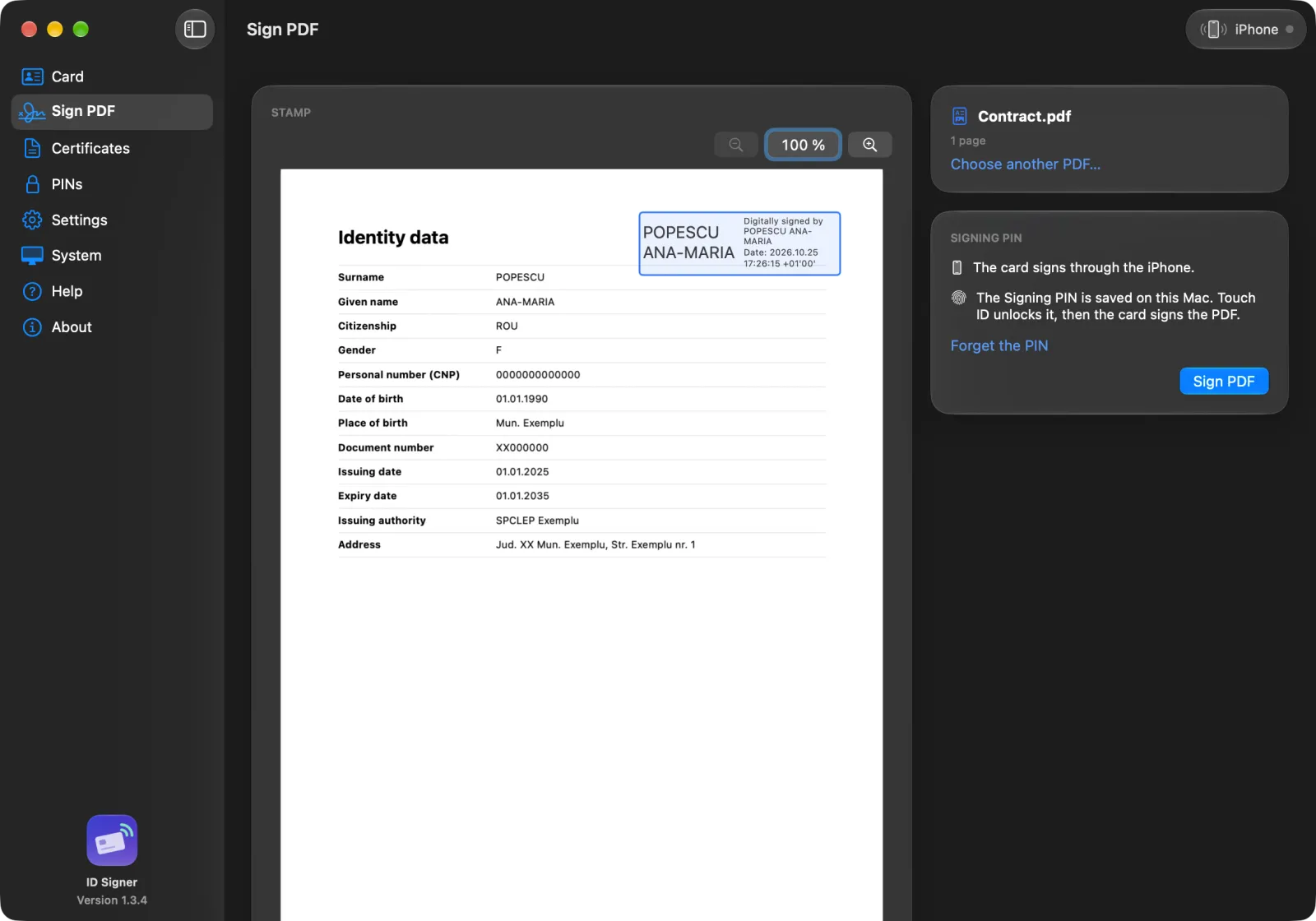
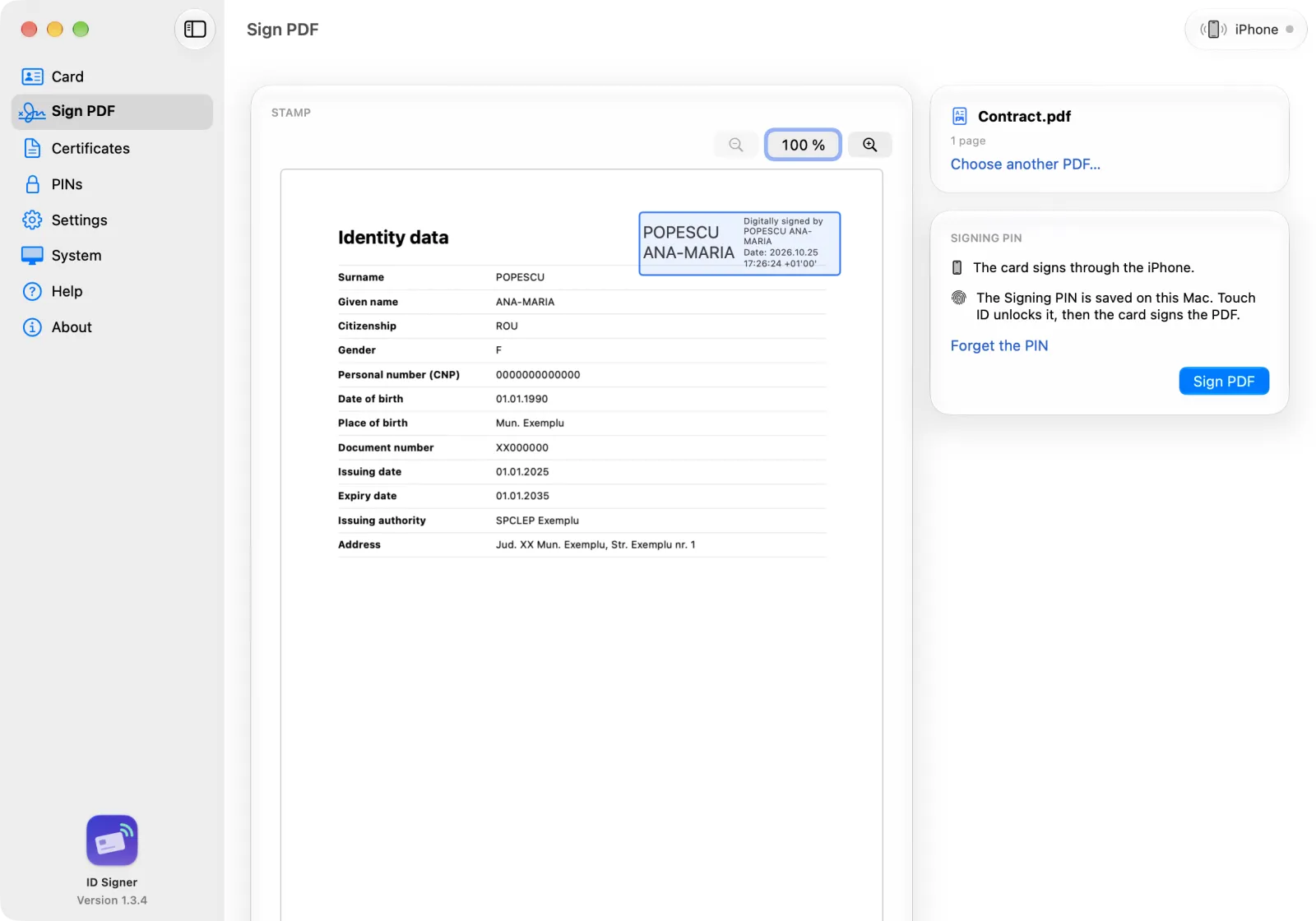
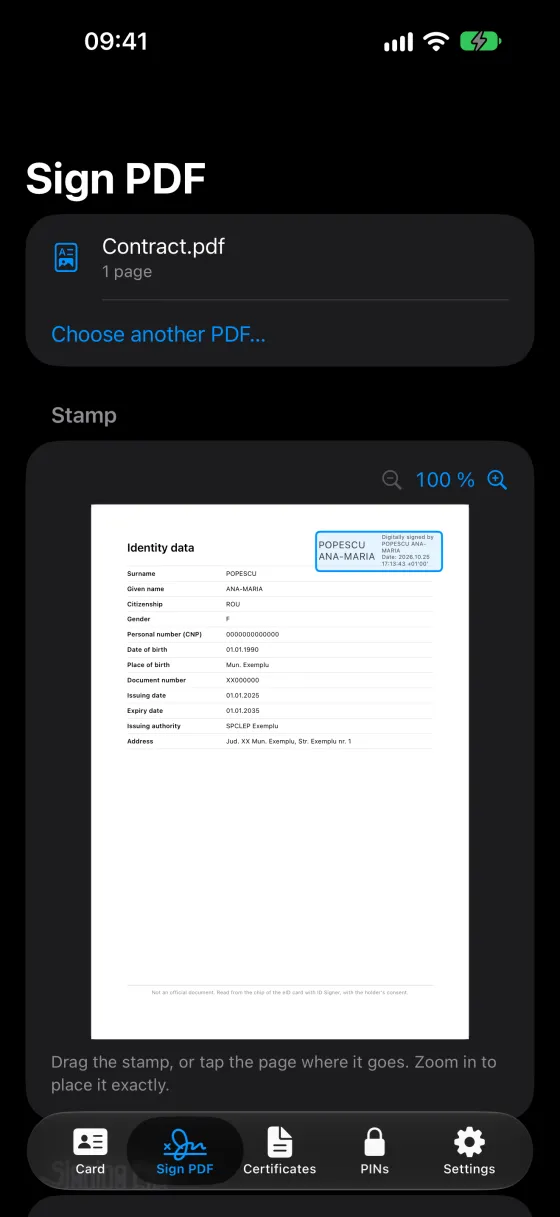
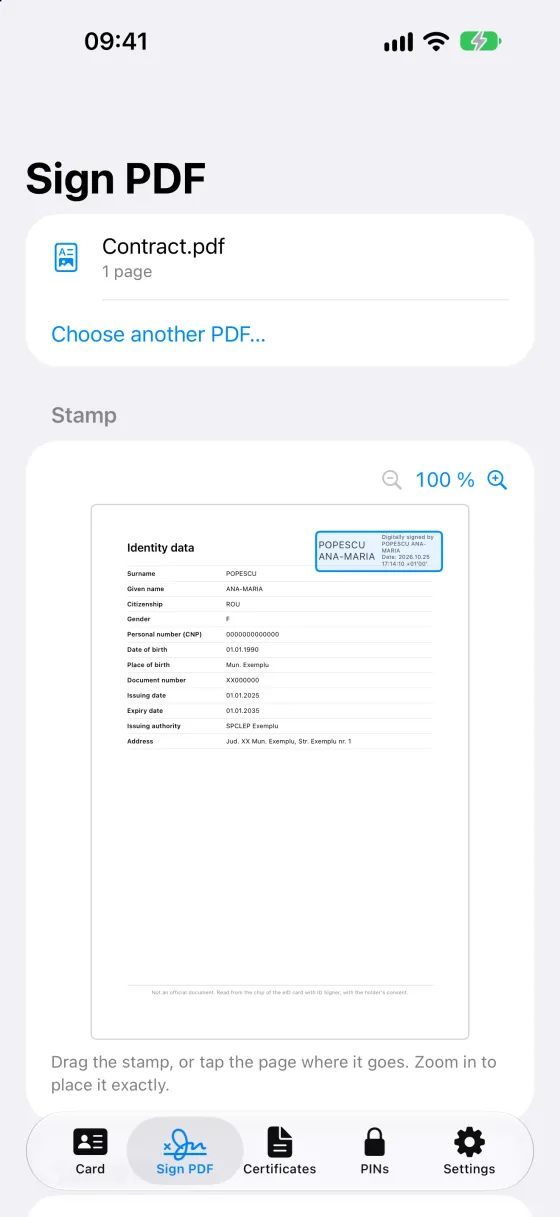
Cu semnătura electronică avansată de pe card. Pui ștampila unde vrei pe pagină, iar aplicația te anunță dacă vede text sub ea.With the advanced electronic signature on your card. Put the stamp anywhere on the page, and the app tells you if it spots text underneath.
Semnat digital deDigitally signed byANA-MARIA EXEMPLUDataDate: 2026.10.24 14:05:31 +03'00'
Te autentifici pe site-uriSign in to websites
Safari, Chrome și Firefox pe Mac, Safari pe iPhone. Când site-ul îți cere certificatul, confirmi cu PIN-ul cardului.Safari, Chrome and Firefox on the Mac, Safari on the iPhone. When a site asks for your certificate, you confirm with your Card PIN.
hub.mai.gov.ro
Alege un certificatChoose a certificate
ANA-MARIA EXEMPLU
Îți vezi datele și fotografiaSee your data and photo
Datele de identitate, adresa, valabilitatea cardului și certificatele. PIN-ul cardului îl poți schimba direct din aplicație.Your identity details, address, expiry date and certificates. You can change your Card PIN right in the app.
DomiciliuAddressStr. Exemplu 1
PIN cardCard PIN3 încercări3 tries
PIN semnareSigning PIN3 încercări3 tries
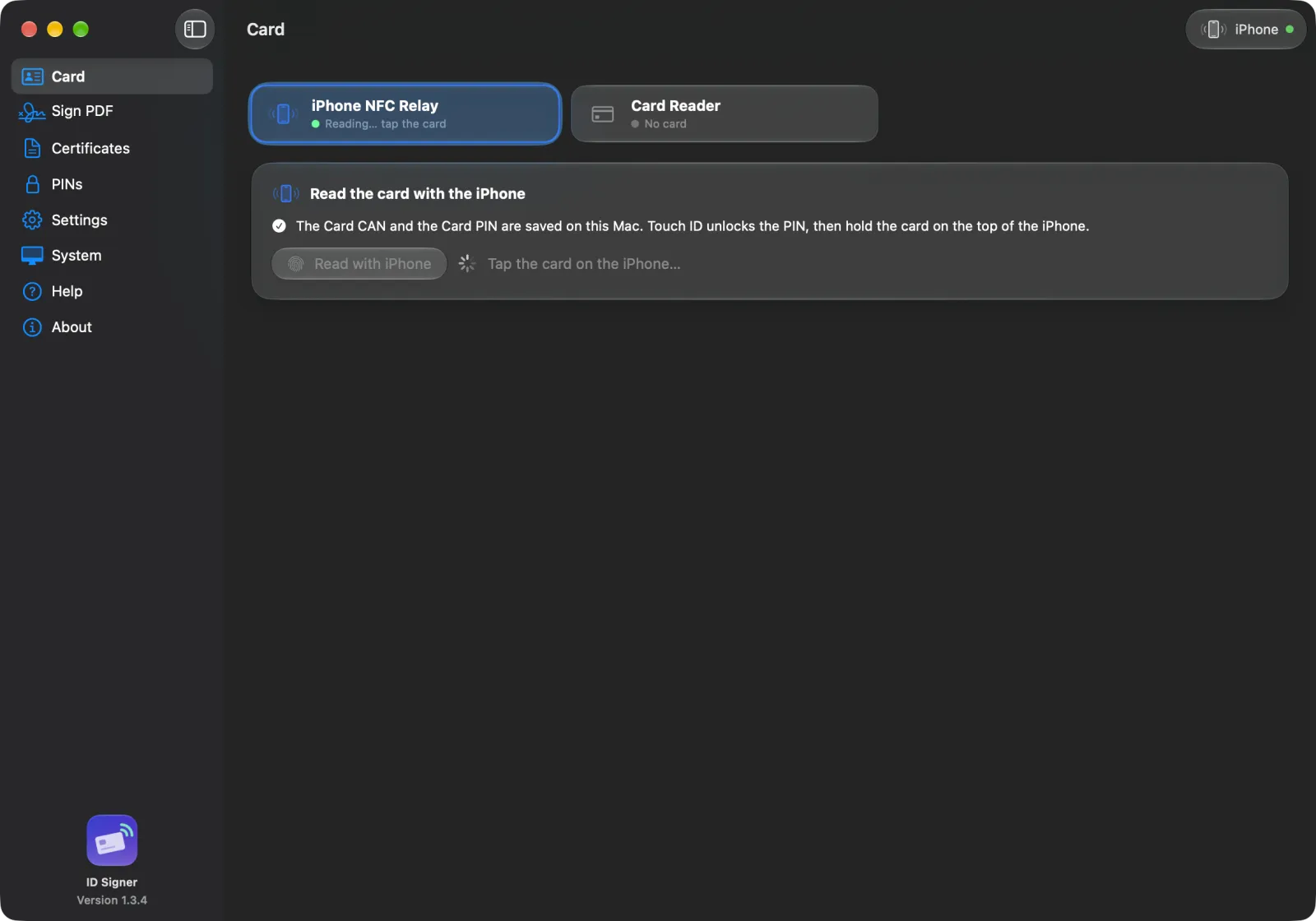
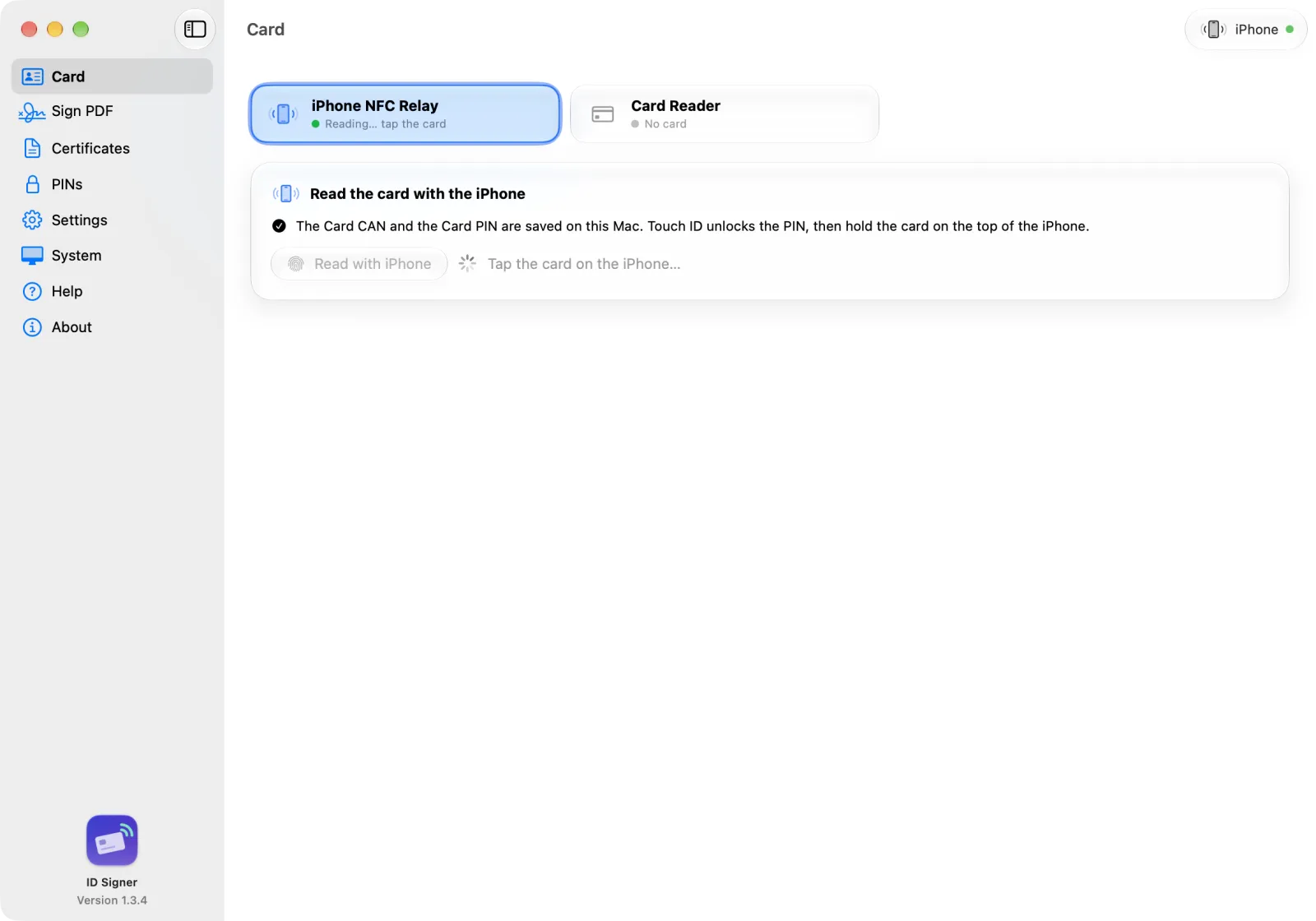
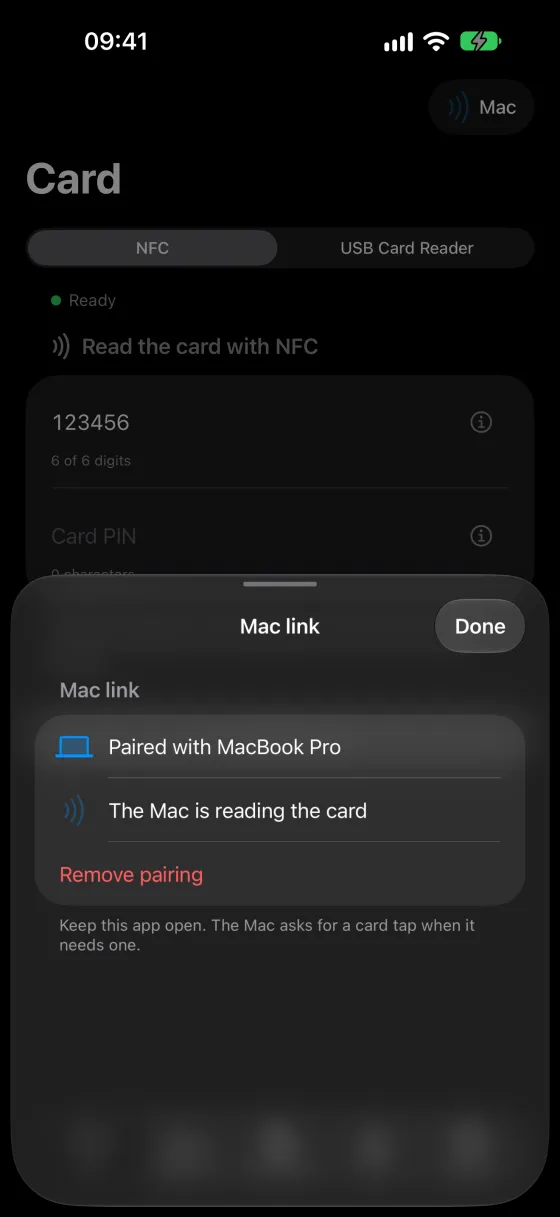
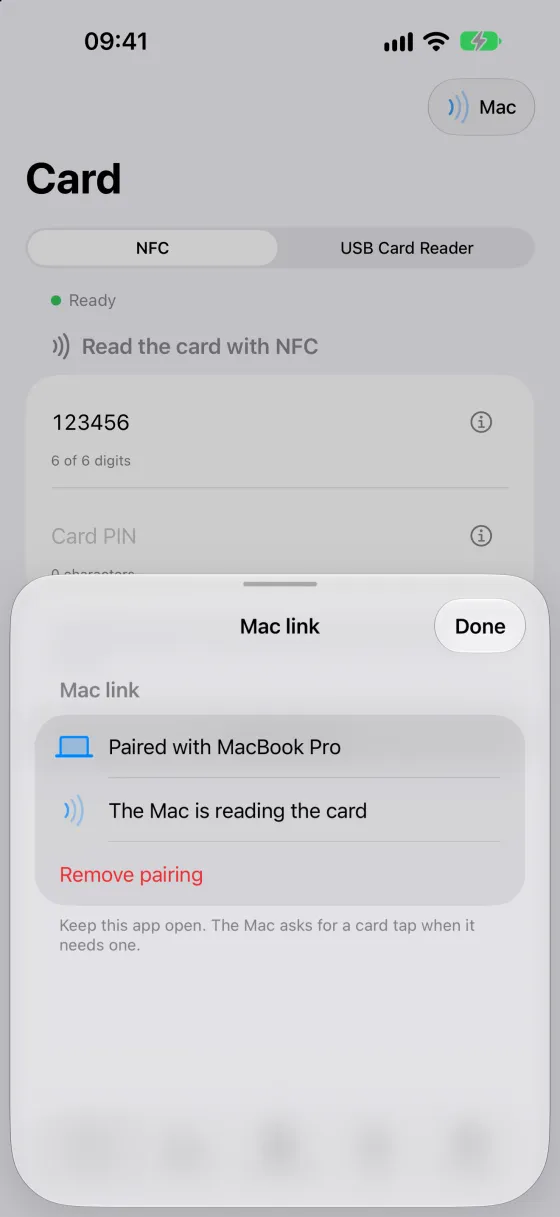
iPhone-ul devine cititor pentru MacYour iPhone becomes the Mac’s card reader
N-ai cititor USB? Mac-ul citește cardul prin NFC-ul iPhone-ului. Le asociezi o dată, cu un cod QR, și ții ID Signer deschis pe amândouă.No USB reader? Your Mac reads the card through your iPhone’s NFC. Pair them once with a QR code, and keep ID Signer open on both.
Maccere semnăturaasks for a signature
· · ▸ · ·
iPhonecitește cardulreads the card
AplicațiaThe app
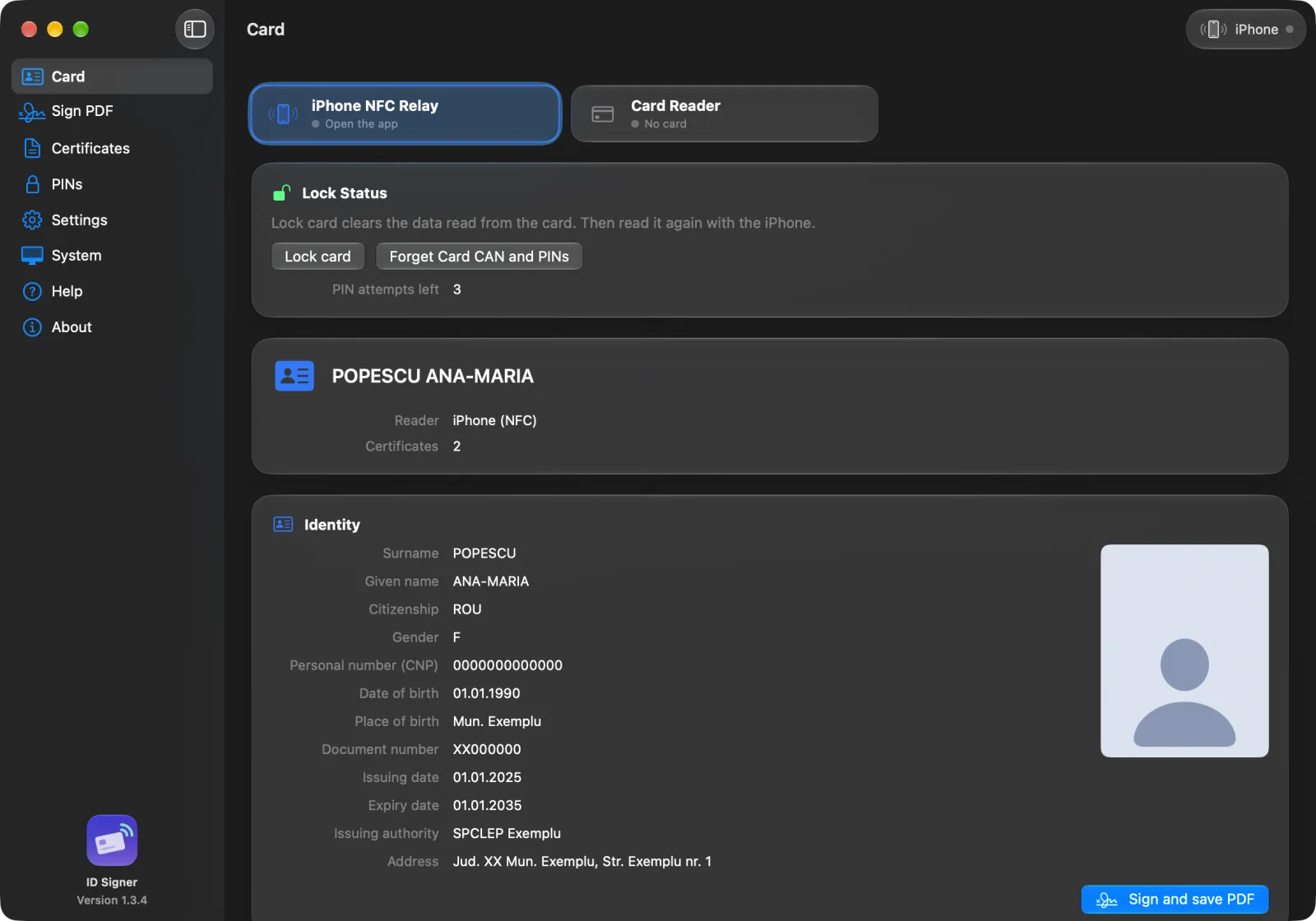
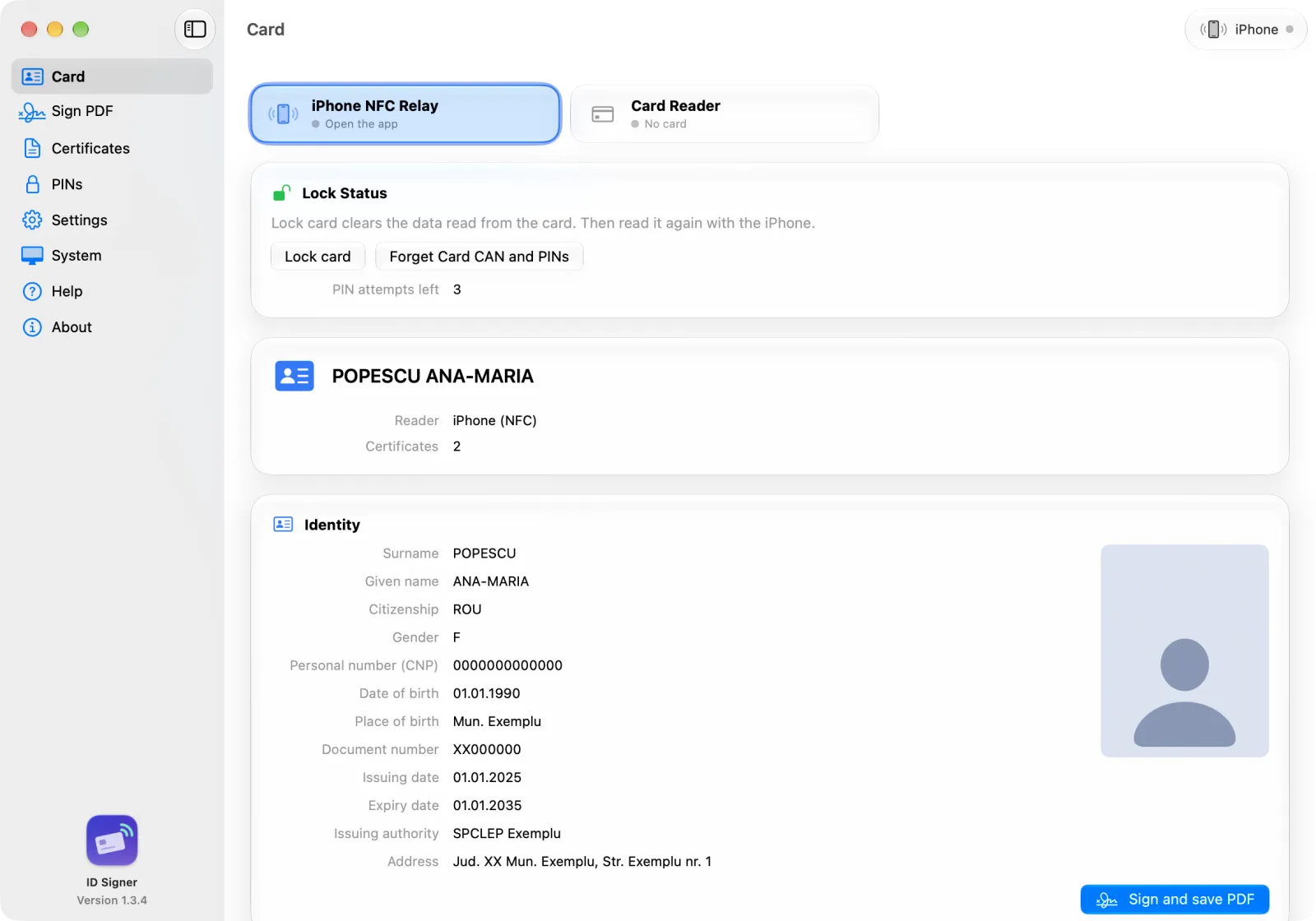
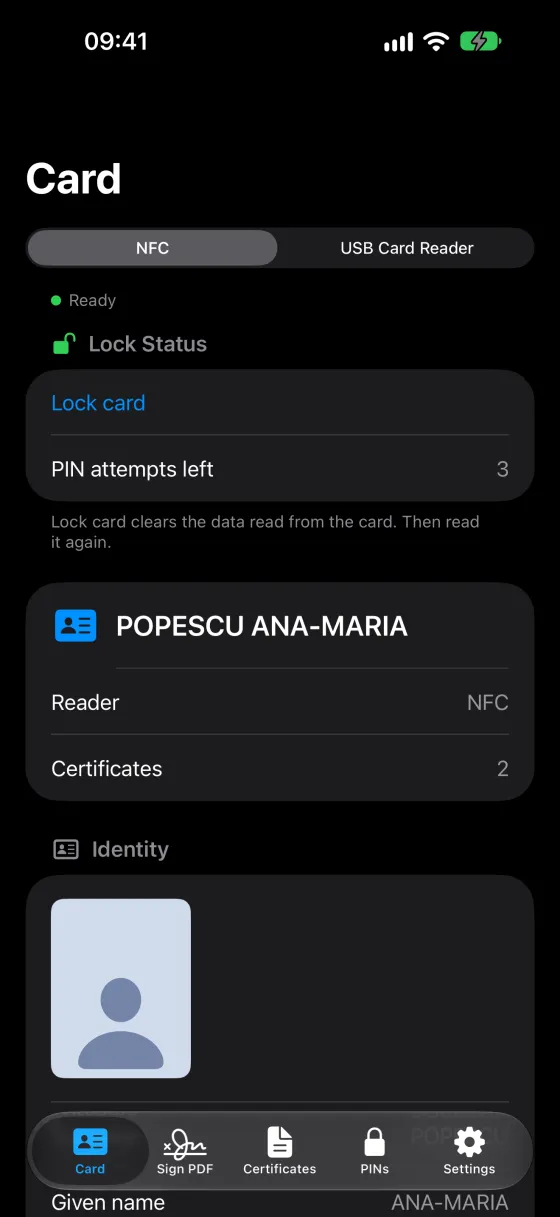
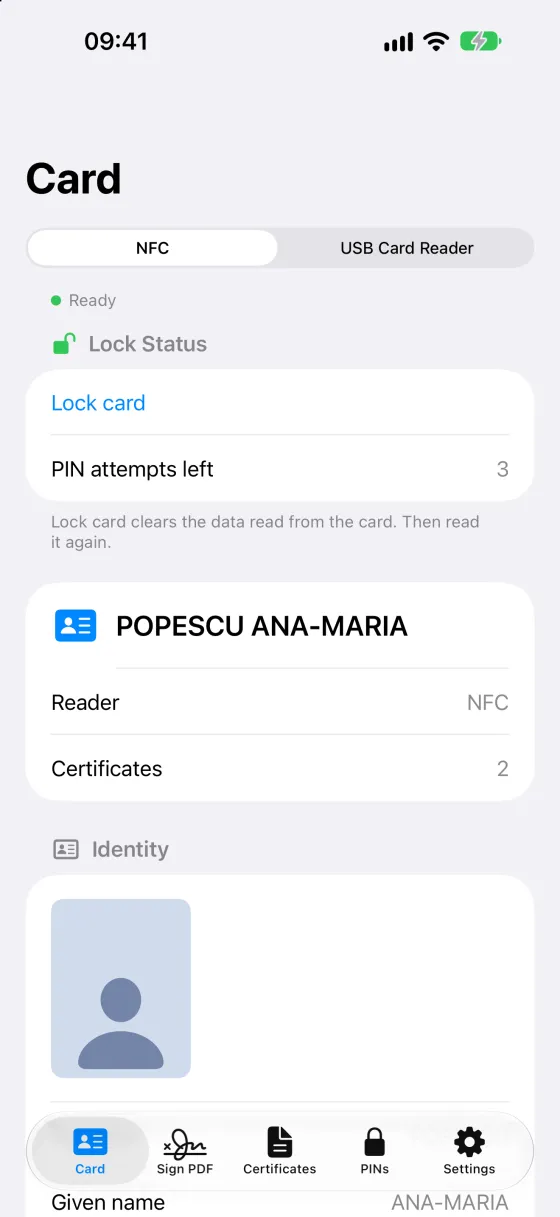
Așa arată aplicația.Here’s what it looks like.
Vezi datele de pe cipSee the data on the chip
Nume, adresă, valabilitate și fotografieName, address, expiry date and photo
Câte încercări de PIN mai ai, când cardul le raporteazăHow many PIN tries you have left, when the card reports them
Certificatele de pe card, cu titular, emitent și valabilitateThe card’s certificates, with holder, issuer and expiry
Semnezi PDF-uri cu certificatul de pe cardSign PDFs with your card’s certificate
Tragi ștampila unde vreiDrag the stamp where you want it
Touch ID sau Face ID deblochează PIN-ul salvatTouch ID or Face ID unlocks the saved PIN
Pe Mac sau pe iPhoneOn the Mac or the iPhone
Te autentifici de pe iPhone sau de pe MacSign in from your iPhone or your Mac
Site-ul cere, tu confirmi cu PIN-ulThe site asks, you confirm with your PIN
Le asociezi o dată; cu aplicația deschisă, Mac-ul citește prin iPhonePair once; with the app open, the Mac reads through the iPhone
Prin rețeaua locală, criptatOver the local network, encrypted
În capturi apar date inventate, nu ale unei persoane reale.The screenshots use made-up data, not a real person’s.
Cum funcționeazăHow it works
Prima citire, în trei pași.Your first read, in three steps.
Introduci CAN-ul carduluiEnter the Card CAN
Cele 6 cifre din colțul din dreapta jos, de pe fața cardului. Cu ele, aplicația deschide o legătură securizată cu cipul.The 6 digits in the bottom-right corner on the front of the card. The app uses them to open a secure link to the chip.
Introduci PIN-ulEnter your PIN
PIN-ul cardului, ca să te autentifici și să-ți vezi datele. PIN-ul de semnare, ca să semnezi documente.Your Card PIN to sign in and see your data. Your Signing PIN to sign documents.
Ții cardul lângă iPhoneHold the card to your iPhone
Sau, pe Mac, îl pui în cititor. Pe iPhone, o bară arată progresul citirii. Aplicația ține minte CAN-ul, iar PIN-urile doar dacă vrei.Or, on the Mac, put it in a reader. On the iPhone, a bar shows the reading progress. The app remembers the CAN, and your PINs only if you want.
Mac & iPhone
O singură aplicație, pentru Mac și iPhone.One app for your Mac and your iPhone.
Mac
Cardul apare în sistem ca token, așa că Safari, Chrome, Firefox și Adobe Acrobat îl pot folosi.
The card shows up as a system token, so Safari, Chrome, Firefox and Adobe Acrobat can use it.
Cu un cititor USB sau cu iPhone-ul ca cititor.
With a USB reader or with the iPhone as the reader.
Deschizi PDF-ul din Mail sau din Finder, ori îl tragi pe pictograma din Dock.
Open a PDF from Mail or Finder, or drop it on the Dock icon.
macOS 26 sau mai nou · cititor USB opționalmacOS 26 or later · USB reader optional
iPhone
Citești cardul prin NFC, inclusiv fotografia de pe cip.
Read the card over NFC, photo included.
Te autentifici în Safari și deschizi PDF-uri din „Partajează”, ca să le semnezi.
Sign in with Safari, and open PDFs from the share sheet to sign them.
Poate fi cititorul de carduri al Mac-ului.
Works as your Mac’s card reader.
iOS 26 sau mai nou · iPhone cu NFCiOS 26 or later · iPhone with NFC
Merge și la mine?Will it work for me?
Ai nevoie de patru lucruri.You need four things.
Cartea electronică de identitate (CEI)The electronic ID card (CEI)Cardul cu cip, cu certificatele activate.The chip card, with its certificates activated.
PIN-urile carduluiThe card's PINsLe-ai ales când ai ridicat cardul.You chose them when you picked up your card.
Un iPhone cu NFC sau, pentru Mac, un cititor USBAn iPhone with NFC or, for the Mac, a USB readerOrice iPhone recent are NFC.Every recent iPhone has NFC.
macOS 26 sau iOS 26, ori mai noumacOS 26 or iOS 26, or laterVersiunile minime de care ai nevoie.The minimum versions you need.
De ce poți avea încredereWhy you can trust it
Cardul e al tău și rămâne la tine.The card is yours. It stays with you.
Fără servereNo servers
Aplicația nu are server. Datele cardului nu ajung la noi. La autentificare, site-ul primește certificatul.The app has no server. Your card data never reaches us. When you sign in, the website receives your certificate.
Construită pe tehnologia AppleBuilt on Apple technology
Pe Mac, cardul devine un token CryptoTokenKit, sistemul Apple pentru carduri inteligente. De aceea îl pot folosi browserele și Adobe Acrobat.On the Mac, the card becomes a CryptoTokenKit token, Apple’s own smart card framework. That’s why browsers and Adobe Acrobat can use it.
Nu încearcă PIN-uri la norocIt never guesses your PIN
Dacă cardul respinge un PIN salvat, aplicația îl șterge, ca să nu-l mai încerce.If the card rejects a saved PIN, the app deletes it, so it never tries it again.
Certificatul tău, de la MAIYour certificate, from MAI
Semnezi cu certificatul de pe cardul tău. Aplicația nu emite certificate.You sign with the certificate on your own card. The app doesn’t issue certificates.
Legătură criptatăEncrypted link
Mac-ul și iPhone-ul comunică doar în rețeaua locală, cu o cheie stabilită la asociere.The Mac and the iPhone talk only over your local network, with a key set when you pair them.
Făcută în RomâniaMade in Romania
De Graffino, din Sibiu. Datele companiei sunt la „Date legale”.By Graffino, in Sibiu. Company details are under “Legal notice”.
Nu-ți cerem niciodată PIN-ul sau CAN-ul la telefon, pe e-mail sau prin SMS.We will never ask for your PIN or CAN by phone, email or text.
PrețPrice
Citirea cardului e gratuită. Semnarea (ID Signer Pro) se plătește o singură dată.Reading your card is free. Signing (ID Signer Pro) is a one-time purchase.
Fără abonament. Plătești ID Signer Pro o singură dată, îl folosești pe Mac și pe iPhone și îl poți împărți cu familia prin Partajarea familială.No subscription. Pay for ID Signer Pro once, use it on your Mac and iPhone, and share it with your family through Family Sharing.
Ce primeștiWhat you get
GratuitFree0
ID Signer Pro49,99 lei€9.99plată unicăone time
Citești datele cardului; pe iPhone, și fotografiaRead the card data, plus the photo on the iPhone
Autentificare pe Mac, cu cititor USBSign-in on the Mac with a USB reader
✓
✓
Semnezi PDF-uri, cu ștampilă vizibilăSign PDFs, with a visible stamp
—
✓
PDF semnat cu datele tale de identitateA signed PDF with your identity data
—
✓
iPhone-ul ca cititor pentru MacYour iPhone as the Mac’s reader
—
✓
Autentificare prin iPhone (în Safari pe iPhone și în browserele de pe Mac)Sign-in through the iPhone (Safari on the iPhone, browsers on the Mac)
—
✓
ID Signer Pro pe Mac și iPhone, cu Partajarea familialăID Signer Pro on Mac and iPhone, with Family Sharing
—
✓
Prețul include TVA. Apple se ocupă de plată și de rambursări. App Store îți arată prețul în moneda ta.The price includes VAT. Apple handles payment and refunds. The App Store shows the price in your currency.
Întrebări frecventeFAQ
Ce ne întreabă lumea.What people ask us.
Am nevoie de un cititor de carduri?Do I need a card reader?
Nu. iPhone-ul citește cardul prin NFC, iar Mac-ul poate folosi iPhone-ul drept cititor (ID Signer Pro). Pe Mac merge și un cititor USB.No. The iPhone reads the card over NFC, and the Mac can use the iPhone as its reader (ID Signer Pro). A USB reader also works on the Mac.
Unde găsesc CAN-ul cardului?Where is the Card CAN?
Pe fața cardului, în colțul din dreapta jos, sub data expirării: 6 cifre. Nu e un PIN.On the front of the card, bottom right, under the expiry date. It’s 6 digits, and it’s not a PIN.
Ce PIN-uri am?Which PINs do I have?
PIN-ul cardului, de 4 cifre, ca să te autentifici și să-ți vezi datele. PIN-ul de semnare, de minimum 6 caractere, ca să semnezi documente. Le-ai ales când ai ridicat cardul.Your 4-digit Card PIN, to sign in and see your data. Your Signing PIN, at least 6 characters, to sign documents. You chose both when you picked up your card.
Ce valoare juridică are semnătura?What legal effect does the signature have?
Aplicația folosește certificatul de semnătură electronică avansată emis gratuit de MAI, dacă e pe card și e valabil.The app uses the advanced electronic signature certificate issued free by the Ministry of Internal Affairs (MAI), if it is on your card and valid.
În România, un document semnat așa are, în condițiile legii, aceeași valoare ca unul semnat de mână.In Romania, a document signed this way has, subject to legal requirements, the same effect as one signed by hand.
Unele proceduri cer o semnătură electronică calificată, de la un furnizor autorizat.Some procedures require a qualified electronic signature from an accredited provider.
Verifică ce cere instituția la care depui documentul.Check what the institution you file with requires.
Ce se întâmplă dacă greșesc PIN-ul?What if I type a wrong PIN?
Fiecare PIN greșit consumă o încercare, iar aplicația nu încearcă niciodată PIN-uri la noroc. Dacă PIN-ul se blochează, mergi la serviciul de evidență a persoanelor.Each wrong PIN uses up one try, and the app never guesses. If the PIN locks, visit your local population records office.
PDF-ul cu datele de identitate este un act oficial?Is the identity PDF an official document?
Nu. E un rezumat al datelor de pe cip, semnat cu certificatul tău. Nu înlocuiește cartea de identitate.No. It’s a summary of the data on the chip, signed with your certificate. It doesn’t replace your ID card.
Achiziția merge pe ambele dispozitive?Does the purchase work on both devices?
Da. Cu același cont Apple, ID Signer Pro merge pe Mac și pe iPhone. Prin Partajarea familială îl primesc și membrii familiei. Dacă ID Signer Pro nu apare pe un dispozitiv nou, apasă „Restaurează achizițiile”.Yes. With the same Apple Account, ID Signer Pro works on both the Mac and the iPhone. With Family Sharing, your family members get it too. If ID Signer Pro doesn’t show up on a new device, tap “Restore Purchases”.
Aplicația este a statului?Is this a government app?
Nu. ID Signer e făcut de Graffino și nu e afiliat cu Ministerul Afacerilor Interne sau cu Autoritatea pentru Digitalizarea României.No. ID Signer is made by Graffino and is not affiliated with the Ministry of Internal Affairs or the Authority for Romania's Digitalisation.
AjutorHelp
Când ceva nu merge.When something doesn’t work.
Aplicația nu găsește cardulThe app can’t find the card
Scoate cititorul și conectează-l din nou.
Unplug the reader and plug it in again.
Introdu cardul până la capăt, cu cipul înainte.
Push the card all the way in, chip first.
Așteaptă câteva secunde.
Wait a few seconds.
Cardul s-a mișcatThe card moved
Ține cardul lipit de partea de sus a iPhone-ului.
Hold the card against the top of the iPhone.
Nu-l mișca până apare „Gata”.
Keep it still until you see “Done”.
La citire, aplicația poate reîncerca singură dacă legătura NFC se întrerupe.
During a read, the app may retry on its own if the NFC link drops.
Mac-ul nu găsește iPhone-ulYour Mac can’t find your iPhone
Deschide aplicația pe iPhone.
Open the app on the iPhone.
Conectează-le la aceeași rețea Wi-Fi.
Connect both to the same Wi-Fi network.
Permite accesul la rețeaua locală: pe iPhone în Configurări, pe Mac în Configurări sistem.
Allow Local Network access: in Settings on the iPhone, in System Settings on the Mac.
Firefox nu vede cardulFirefox doesn’t offer your certificate
Actualizează Firefox la ultima versiune.
Update Firefox to the latest version.
Repornește Firefox după ce aplicația citește cardul.
Restart Firefox after the app reads the card.
Alege certificatul când site-ul îl cere.
Choose the certificate when the site asks.
Suport:Support:support@graffino.com
Cardul tău poate mai mult decât crezi.Your ID card can do more than you think.
Confidențialitate, termeni și date legale.Privacy, terms and legal notice.
Politica de confidențialitatePrivacy policy
Versiune de lucru, de verificat de un jurist. Ultima actualizare: 25 octombrie 2026.Working draft, to be reviewed by a lawyer. Last updated: 25 October 2026.
Operator pentru corespondență, site și achiziții: Graffino Software SRL, CUI RO35753397, J32/341/2016, Calea Dumbrăvii 71, et. 1, ap. 4, 550324 Sibiu, România. Contact: support@graffino.com; protecția datelor: data.protection@graffino.com.
Controller for correspondence, the website and purchases: Graffino Software SRL, VAT ID RO35753397, trade register no. J32/341/2016, Calea Dumbrăvii 71, floor 1, apt. 4, 550324 Sibiu, Romania. Contact: support@graffino.com; data protection: data.protection@graffino.com.
Datele de pe card (identitate, CNP, fotografie, certificate) sunt citite și prelucrate doar pe dispozitivul tău. Nu le primim, nu le stocăm și nu le transmitem.
The card data (identity, personal number, photo, certificates) is read and processed only on your device. We do not receive, store or transmit it.
Dacă alegi, CAN-ul cardului și PIN-urile sunt păstrate în Keychain-ul dispozitivului, protejate de Touch ID sau Face ID. Le ștergi oricând din aplicație.
If you choose, the Card CAN and the PINs are kept in the device Keychain, protected by Touch ID or Face ID. You delete them in the app at any time.
Legătura Mac–iPhone folosește rețeaua locală, criptată cu o cheie din asociere. Nu trece prin serverele noastre.
The Mac–iPhone link uses the local network, encrypted with a key from the pairing. It does not pass through our servers.
Apple procesează achizițiile. Nu primim datele tale de plată.
Apple processes the purchases. We do not receive your payment data.
Nu folosim analiză, publicitate sau urmărire. Nu ne trimite date de pe card sau capturi cu ele în mesajele de suport.
We use no analytics, advertising or tracking. Do not send card data, or screenshots that show it, in support messages.
Site-ul: găzduit pe GitHub Pages (GitHub, Inc.), care primește adresa IP pentru a livra pagina. Fonturile Google se încarcă doar cu acordul tău (Setări cookie-uri). Site-ul nu pune cookie-uri.
The website: hosted on GitHub Pages (GitHub, Inc.), which receives the IP address to deliver the page. Google Fonts load only with your consent (Cookie settings). The site sets no cookies.
Ai drepturile din GDPR: acces, rectificare, ștergere, opoziție și plângere la ANSPDCP. Scrie-ne la data.protection@graffino.com.
You have your GDPR rights: access, rectification, erasure, objection and a complaint to the Romanian DPA (ANSPDCP). Write to data.protection@graffino.com.
Politicile generale Graffino: confidențialitate și GDPR. Pentru ID Signer se aplică textul de aici.
The general Graffino policies: privacy and GDPR. For ID Signer, the text here applies.
Termeni și condițiiTerms and conditions
Versiune de lucru, de verificat de un jurist.Working draft, to be reviewed by a lawyer.
Aplicația este licențiată, nu vândută, conform Licenței standard Apple pentru utilizatorul final (EULA).
The app is licensed, not sold, under Apple's Standard End User License Agreement (EULA).
ID Signer nu este un produs al Ministerului Afacerilor Interne și nu este afiliat cu acesta. Cardul, certificatele și PIN-urile sunt ale tale și ale emitentului.
ID Signer is not a product of, and is not affiliated with, the Ministry of Internal Affairs. The card, its certificates and its PINs belong to you and the issuer.
Ești responsabil pentru PIN-urile tale și pentru documentele pe care le semnezi. Ștampila vizibilă este o imagine; validitatea o arată semnătura digitală din PDF.
You are responsible for your PINs and the documents you sign. The visible stamp is an image; the digital signature in the PDF shows the validity.
Rambursările se cer de la Apple, la reportaproblem.apple.com. Drepturile tale legale de consumator rămân neatinse.
Refunds are requested from Apple, at reportaproblem.apple.com. Your statutory consumer rights are not affected.
Legea aplicabilă: legea română, fără a-ți lua protecția pe care ți-o dă legea țării în care locuiești.
Governing law: Romanian law, without removing the protection that the law of your country of residence gives you.
Contact juridic: legal@graffino.com. Termenii generali Graffino: graffino.com/terms-of-service; pentru ID Signer se aplică textul de aici.
Legal contact: legal@graffino.com. The general Graffino terms: graffino.com/terms-of-service; for ID Signer, the text here applies.
Date legaleLegal notice
Editor: Graffino Software SRL, CUI RO35753397, Reg. Com. J32/341/2016, Calea Dumbrăvii 71, et. 1, ap. 4, 550324 Sibiu, România. graffino.com
Găzduire: GitHub Pages, GitHub, Inc., 88 Colin P. Kelly Jr. Street, San Francisco, CA 94107, SUA. DNS: Cloudflare, Inc.
Hosting: GitHub Pages, GitHub, Inc., 88 Colin P. Kelly Jr. Street, San Francisco, CA 94107, USA. DNS: Cloudflare, Inc.
Protecția consumatorilor: ANPC, anpc.ro.
Consumer protection: ANPC (Romania), anpc.ro.
SecuritateSecurity
Raportează o vulnerabilitate la legal@graffino.com, cu „Security” în subiect. Scrie versiunea aplicației, platforma și pașii. Nu trimite date de pe card sau PIN-uri.
Report a vulnerability to legal@graffino.com, with "Security" in the subject. Give the app version, the platform and the steps. Do not send card data or PINs.
Confirmăm raportul în 5 zile lucrătoare, reparăm vulnerabilitatea într-o versiune nouă și raportăm vulnerabilitățile exploatate activ conform Regulamentului UE privind reziliența cibernetică (CRA).
We confirm the report within 5 working days, fix the vulnerability in a new release, and report actively exploited vulnerabilities as the EU Cyber Resilience Act (CRA) requires.
Folosim doar stocarea necesară pentru limbă, temă și alegerea ta. Cu acordul tău, încărcăm fonturile site-ului de la Google Fonts, care primește adresa ta IP. Fără analiză și fără publicitate.We use only the storage that the site needs for the language, the theme and your choice. With your consent, we load the site fonts from Google Fonts, which receives your IP address. No analytics and no advertising.